
- Forums
- Satellite TV receivers & systems support forums
- DISH SETUP: Single sat, Multi-Sat & Motorised
- Satellite Meters and Installation Equipment
You are using an out of date browser. It may not display this or other websites correctly.
You should upgrade or use an alternative browser.
You should upgrade or use an alternative browser.
Satlink ws-6922 reviving
- Thread starter ahmedksal
- Start date

- My Satellite Setup
- A little less analogue, and a lot more crap.
- My Location
- UK
The firmware number on the (screen image of the ) CD is exactly the same as the one your reseller sent you.
Are you certain you have followed the instructions for upgrading to the letter ?
Are you certain you have followed the instructions for upgrading to the letter ?
- My Satellite Setup
- A little less analogue, and a lot more crap.
- My Location
- UK
Unless there is a hidden reset button on the casing (Perhaps inside the battery compartment) you will need to follow the update instructions within the manual, again, or send it off to your reseller for a repair.
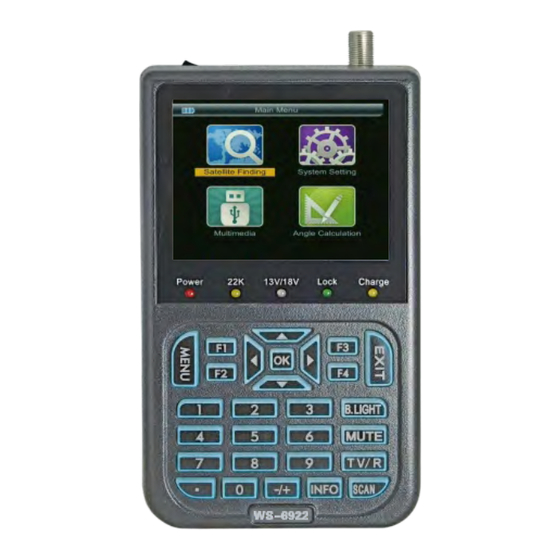
 www.manualslib.com
Pages 6 and 7 contain the detail for connection and button pressing.
SATLINK WS-6922 USER MANUAL Pdf Download
View and Download Satlink WS-6922 user manual online. HD Satellite Finder Meter. WS-6922 measuring instruments pdf manual download.
www.manualslib.com
Pages 6 and 7 contain the detail for connection and button pressing.
@Channel Hopper
Sir, as i said earlier meter cannot boot, so how can i enter menu to upgrade or either my english is not up to standard and cannot be understand. there is no reset button under battery compartment. the only advice is on how to program this dead meter through serial to usb cable and what software that accepts the BT_CP09_V1_36_20120427_1416_SATLINK.bin image file. thanks and have a nice day.
Sir, as i said earlier meter cannot boot, so how can i enter menu to upgrade or either my english is not up to standard and cannot be understand. there is no reset button under battery compartment. the only advice is on how to program this dead meter through serial to usb cable and what software that accepts the BT_CP09_V1_36_20120427_1416_SATLINK.bin image file. thanks and have a nice day.
- My Satellite Setup
- A little less analogue, and a lot more crap.
- My Location
- UK
Your first post confirms the meter is doing something (blinking lights) , so it is not dead.
What procedure did you use to update the meter first time round ?
What procedure did you use to update the meter first time round ?
@Channel Hopper
sir, since last sunday, i have been seeking help on how to revive this meter and all my explanation have been confirmed, but there has not been a single advice or result on how to fix this meter. so please could you explain on what should i do, try my meter away or buy a new one, since my reseller cannot help. i am not looking for free solution if there is one and i am willing to buy it. thanks in advance and have a nice day.
sir, since last sunday, i have been seeking help on how to revive this meter and all my explanation have been confirmed, but there has not been a single advice or result on how to fix this meter. so please could you explain on what should i do, try my meter away or buy a new one, since my reseller cannot help. i am not looking for free solution if there is one and i am willing to buy it. thanks in advance and have a nice day.

beavs2112
Member
- My Satellite Setup
- see signature
- My Location
- London, Ontario Canada
Hello @ahmedksal. Some other meters I have heard of (not mentioning names) don't work after trying to load the wrong software. I do not know the correct procedure for your meter because I don't have any like it. Disclaimer: Warning you could damage your meter so try this at your own risk. At worst you are no farther ahead but it might save you having to buy a new meter. They do this procedure:
1- first you need a USB 32GB or under clean and formatted FAT32 inserted into your computer
2- copy the software BT_CP09_V1_36_20120427_1416_SATLINK.bin or whatever is latest software to the USB
3- rename the file BT_CP09_V1_36_20120427_1416_SATLINK.bin on the USB to flash.bin
4- eject USB from computer then insert USB into meter
5- press MENU key on meter several times while turning meter power switch on
6- follow the instructions like normal for a USB software upgrade
Good luck!
1- first you need a USB 32GB or under clean and formatted FAT32 inserted into your computer
2- copy the software BT_CP09_V1_36_20120427_1416_SATLINK.bin or whatever is latest software to the USB
3- rename the file BT_CP09_V1_36_20120427_1416_SATLINK.bin on the USB to flash.bin
4- eject USB from computer then insert USB into meter
5- press MENU key on meter several times while turning meter power switch on
6- follow the instructions like normal for a USB software upgrade
Good luck!
- My Satellite Setup
- A little less analogue, and a lot more crap.
- My Location
- UK
Something in the back of my head keeps suggesting the file needs to be put in the root menu of the USB stick.
