Up to 8 lnb's on your dreambox - in pictures

Status
Not open for further replies.

Analoguesat

Administrator
Staff member
My Satellite Setup
TM 5402HD
Sky+ UK.
My Location
Scottish Borders
I recently upgraded my installation to work with up to 8 lnb's. This is how I got it it work on my DB 7020.

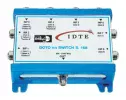
First of all you need an 8 way lnb switch like the one pictured - The one I am using an is an EMP-Centauri P168 clone by a company called IDTE.
 

Attachments

  • idte 8way.webp
    idte 8way.webp
    13.6 KB · Views: 1,126
If you are replacing a standard 4 way lnb switch then get ports 1 - 4 working correctly first using disecq 1.0 (a fairly standard setup, so shouldnt be too difficult)

In fact if you are doing a straight swap for a 4way it should work straight out of the box as long as you connect the ports up in the same order on the new switch.

My previous lnb set up was:

port 1 - Astra 1 19E
port 2 - Sirius 2 5E
port 3 - Hotbird 13E
port 4 - Eutelsat W2 16E

With Astra 1E slotting at 23E I wanted to add in a fifth lnb for 23E on port 5.

Once you have the first 4 ports working

(in Gemini images its menu- 6 - service searching - sat configuration - 4 satellites via disecq opt A/B)

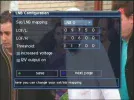
change the top tab to "many sats via disecq rotor" and add a new lnb (yellow button). Set the first column of the new entry to whichever satellite you require - obviously Astra 23E for me.
 

Attachments

  • satconfig1.webp
    satconfig1.webp
    83.3 KB · Views: 1,281
Once you have done this you start tweaking the lnb settings - second column just to the right of the satellite name. There are 2 screens to configure for each lnb. The first set of screens are all the same so I will just post the pic for lnb 0. (Scroll down to the lnb you want to configure and press the ok key)
 

Attachments

  • satconfig2.webp
    satconfig2.webp
    56.9 KB · Views: 925
In the screen above you will see you have to press the blue button to get to the second screen. So be brave and do it!

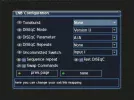
Change the disecq mode to disecq 1.1 on each screen and set the lnb's up as shown below.

port 1 - Astra 1 19E and
port 2 - Sirius 2 5E

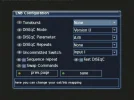
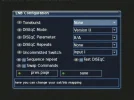
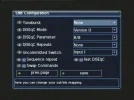
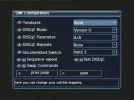
There are 2 main settings that have to be set on each screen - the disecq parameter and the uncommitted switch. Hopefully the pictures will make the set up obvious. The first 4 ports have the uncommitted switch set to "input 1"

Once you have made the changes do not forget to press the green button to save the new configuration for each lnb!
 

Attachments

  • satconfig lnb0.webp
    satconfig lnb0.webp
    40.5 KB · Views: 951
  • satconfig lnb1.webp
    satconfig lnb1.webp
    40.2 KB · Views: 785
port 3 - Hotbird 13E
port 4 - Eutelsat W2 16E
 

Attachments

  • satconfig lnb2.webp
    satconfig lnb2.webp
    41.2 KB · Views: 657
  • satconfig lnb3.webp
    satconfig lnb3.webp
    41.8 KB · Views: 559
And finally port 5. Note - this one is slightly different in that the uncommitted switch is set to "input 2"


Further ports would be setup:

port 6
disecq mode version 1.1
parameter A/B
uncommitted - input 2

port 7
disecq mode version 1.1
parameter B/A
uncommitted - input 2

port 8
disecq mode version 1.1
parameter B/B
uncommitted - input 2
 

Attachments

  • satconfig lnb4.webp
    satconfig lnb4.webp
    46.9 KB · Views: 499
One thing to be aware of - there are 2 types of EMP 8 way switches, and the setup is slightly different between the two. Use the pdf file below to compare the 2 types of setup. My pictures are based on Version 1 in the pdf.


Finally my sincerest thanks to everyone who chipped in with advice last weekend when I wasnt getting anywhere fast and trying to work out 2 or 3 conflicting sets of information!
 

Attachments

Theoretically a DB can handle upto 64 lnb's :eek: however more than 8 lnb's is something in investigate on another day and another thread.
 
This thread is closed so it doesnt get cluttered up with irrelevant stuff, if you have any questions about multi lnb configuration on DB's please start a new thread in an appropriate section.
 
Update - I have successfully put a 6th lnb into the system so I now have access to 28E as well.

I had been hoping to try for the Badr birds at 26E but its an offset lnb on my 1m dish (prime focus on 16E) and I couldnt get any signal off 26E. Never mind its another satellite to play with on the dreambox. :)
 
Second update - I now have a 7th lnb wired in - this one is lashed to the side of my 13E lnb with zip-ties and gives me excellent signals off the high power Eurobird 9E and a couple of the channels off W1 at 10E as well.
 
Its been nearly two years since I set this up now and things are still working reasonably well.

I have run into one small problem with the system which started when I replaced all my coax cables over the summer after water seeped into some of them.....

Because of nearby trees the only place I can get satellite signals is to have my dishes down the bottom of our garden. Originally the 8 way switch was on the house and 7 sets of cable ran down the garden fence. I decided this was rather wasteful and moved the switch down near the dishes.

Anyway Ive now discovered that the system doesnt always change satellite correctly - I often get a "no signal" message coming up. Its my belief the long cable run is degrading the diseqc signals in some way.

After getting very very annoyed for several days at this glitch Ive found the quick way to fix it is just to quickly select manual search for the frequency of the missing channel - a couple of seconds is plenty, and this always brings the channel back. :)
 
Status
Not open for further replies.
Back
Top