Your wxsat pictures

I'm still not doing well, I'll probably go back to basics tomorrow.

Its definitely not the antenna or cable into the property, and this image is via the nooelec dongle (which gives a gain about 5dB above the earlier unit) but this is the best I can get.

I'm convinced its something to to do with the way the CVcable software is enabled since signals from NOAAs can be heard without trouble and stand out from the other pips and squeaks on the waterfall, even though every twenty seconds there is bleeding over the whole local spectrum for about a second or so.NooElec 1811 test.webp
 
If you listen to the NOAA signals via the speakers they are a distinctive ding ding sound. Once you change over to the vac there shouldnt be any sound at all. If you are getting reasonable signals into sdr# then its likely the vac isnt set up right.
 
If you listen to the NOAA signals via the speakers they are a distinctive ding ding sound. Once you change over to the vac there shouldnt be any sound at all. If you are getting reasonable signals into sdr# then its likely the vac isnt set up right.


Yes, sound there and it can be seen as a clear pulse on the waterfall.20181118_155359.webp20181118_155750.webp20181118_160413.webp20181118_160459.webp20181118_160531.webp
 
What audio sampling rate do you have set in the sound control panel?
 
The volume on the recording is only 12.5.Is the volume on airspy turned up full .Perhaps it needs full volume on cable input too
 
That should be fine for noaa reception.

Open wxtoimg and go to the options-recording options tab. Is the soundcard set to cable input?

Capture.webp
 
I only have three options of sample rate - 11, 22, or 44 kHz.

No way to get 16 bits.

Have you a direct link to the VB cable firmware, I might delete and start again.
 
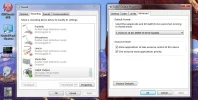
Go to your control panel and select the sound icon, then select the playback tab, then the cable input (it should be the default device) then select it's property's tab, this will open the property's for that device, select the advanced tab, here you can select the 16 bit 48,000 hz settings.

Do the same for the recording.

This should be the correct settings for the WRX software.sound settings.webp


recording.webp
 
OK, VB software is the same as the link (Pack43), and I've set up the audio as per Terryl's recommendations, though I doubt the upgrade from 44 (CD)to 48kHz (DVD) is going to make much of a difference.


Next - low - pass in 30 minutes.
 
It is a good idea to make sure that the WFM Button is ticked tooI often find that changing frequency numbers unticks it.
 
It's always the first thing I check after setting the NOAA frequency.

Still nothing on this morning's pass.20181119_095920.webpNooElec 1811 test.webp
 
Last edited:
Hmm, I may have found the problem but can only check after the next pass, the setting for the sample rate does not show 16 bit.20181119_152457.webp20181119_152512.webp

though I can adjust between the three frequencies offered within the sample rate box.
 
Last edited:
I've deleted the earlier WXtoIMG software, downloaded again and found that the stable version does not install on this laptop, so I've had to reinstall the 21102 beta version a second time, and the same sample rate options are still as per the images above.

Whist scanning the last pass I did find that when enabled, the Tuner AGC in the SDRSharp software would just create noise, and the RTL AGC when enabled would raise the noise and signal by the same amount, so these have been turned off.20181119_153853.webp20181119_154514.webp20181119_154957.webp
 
I spotted a Dell Optiplex in the shed that I thought I'd given away a couple of years back. If I get time this week I'll see what I can do with it as a suitable device. Model number DCTR (microcase 755)

Dell Optiplex 755 Desktop PC - Intel Core 2 Duo 2.2-2.6 GHz - 2GB RAM 20181120_081843.webp
 
Hmm, though the chassis model relates to the Optiplex 755, the front panel shows SX280, which is more how I recall it.

  • General Features:
  • Ultra Small Form Factor
  • Microsoft Windows XP Professional pre-installed w/CoA
  • Intel Pentium 4 3.0 GHz processor with Intel Hyper-Threading Technology
  • Intel 915G Express chipset
  • Memory: 1 GB RAM
  • Hard Drive: 40 GB SATA hard drive
  • Optical Drive: CD-Rom drive
 
I don't know if it has anything to do with it .My recording options are the same as Analoguesats.We have sample bits 16 the 16 cannot be altered. You have sample rate.In SDR controler I use Tuner AGC
vb.webp
 
Which versions of WXtoImg (and SDR Sharp) are you running ? I can only get the beta version to load on the laptop (which is Win 8.1)
 
Back
Top