cmt-bx77dbi DAB radio flashes tuning but is not tuning

statalite

Member
My Satellite Setup
SF8008
DiSEqC motor with 1m dish
Zone 1 @ 28.2°E
Zone 2 @ 28.2°E
Channel Master 1.0m (to be setup)
Channel Master 1.2m (to be setup)
SMR 1224
My Location
UK Midlands
I just bought a second hand cmt-bx77dbi from someone on a facebook selling group, so no chance of a return.

The DAB part of the system worked ok for a few hours when I tried it last night. This morning when I was changing stations, it locked up saying "tuning" I switched the power off and on, went into DAB mode and the same thing, but this time the star meter came up, but it was stuck about 2/3rds of the way through and didnt progress, again I switched the power off and on now it only says "tuning" everytime.

I have followed the instructions and performed a factory reset, which then goes to tune DAB channels on first boot, but still the same.

I have tried both my external and aerial that came supplied, even tried to tune with no aerial, but still keeps saying "tuning" when it blatently isnt, the star meter needs to show for that.

The manual says press auto scan and enter to confirm then the star meter comes up. When auto scan is pressed it should say "Auto Scan?" and "Push Enter" but these don't appear.

I have searched on the net and the best awnser I could find is to wait a couple of days and hope the unit forgets its presets. hope more than anything feel

Otherwise I think that the DAB part won't work which is the main reason I bought it, sods law.

Any help technical or otherwise appreciated.

Kind Regards,
Statalite
 
Interesting development.

I took the unit apart located the dab power circuit board and and another board which it was pinned into, which I can't identity due to lack of knowledge, I separated these two hoping for a loss of power like resetting a CMOS. I put it all back together and it started working like it should! This was for a few minutes.

I left it working and went outside, upon my return a few minutes later there was no sound and I couldn't change station or get it to respond to and dab related commands as with the original problem.

So I took it apart for a second time and put it back together, but this time it did not work as when I took apart the first time. Comes up with "tuning" as original query.

Really confusing as I took it apart and separated the circuit boards the same as tbr first time.

So confused and annoyed.
 
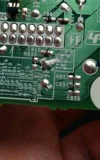
The third picture is the yellow board despite it looking green. One of the numbers says 'SYS RESET' I wonder if I can do anything with that, sorry I'm electronics novice.
 
When something electronic is misbehaving, it's often attributed to bad capacitors in the power supply, check that first for any bulging, leaked or burst caps, just incase (it could be as simple as replacing a cap or two, or it could be as complicated as goosed firmware)...
 
Capacitor C823 looks a tad swollen to me
 
Looks okay to me, but looks like a cheap brand so probably not good anyway...
 
Looks okay to me, but looks like a cheap brand so probably not good anyway...
A convex top indicates swelling slight discolouration on one edge indicates leaking
 
Sounds more like a possible dry joint to me ..
and disturbing the boards brought about a temporary fix ..
I dont like or trust double sided print where eyelet type through board connections are used as on the surface mount pcb FS20017
Since you have already achieved a scan and the channels set ..
try running the unit with the case off and gently flexing the boards whilst operational ..
You may get a response and a chance to pin down the fault at least to a board.
best o luck
VS
 
You can tell that from photos of the internal PCBs?

I was referring to the capacitor brands, not the brand of the radio (it's blatantly obvious it's Sony)...

A convex top indicates swelling slight discolouration on one edge indicates leaking

The top of C823 looks flat to me, and the camera angle & lighting give it an odd shape and colour, look at the angle of the other caps and compare it to the others around it, it's just slightly offset from vertical...
 
I was referring to the capacitor brands, not the brand of the radio (it's blatantly obvious it's Sony)...


The top of C823 looks flat to me, and the camera angle & lighting give it an odd shape and colour, look at the angle of the other caps and compare it to the others around it, it's just slightly offset from vertical...

I can take additional side on pictures? I took those previous pictures next to a window for natural light.
 
The top of C823 looks flat to me, and the camera angle & lighting give it an odd shape and colour, look at the angle of the other caps and compare it to the others around it, it's just slightly offset from vertical...

looks swollen to me and discoloured on lower side especially when viewing through a saturation filter, I do however suspect VS is correct and that the problem may be as a result of a dry joint, but the cap may still need replacing
View attachment 78945
 
Last edited:
looks swollen to me and discoloured on lower side especially when viewing through a saturation filter

The discolouration is the effect of the lighting, presumably the brighter light shining on the PCB resulting in the reflection of the ceiling looking darker than it ought to be, as replicated here with a pringles tube whose metal base is indeed flat, but de to the lighting looks convex, but it isn't:
 

Attachments

  • lighting.webp
    lighting.webp
    37.6 KB · Views: 9

Attachments

  • IMG_20150601_192838~2.webp
    IMG_20150601_192838~2.webp
    255.6 KB · Views: 15
Under C283, see anything?
Hmmm ..
the +ve connection doesn't look quite right ??
Is that oxide ...corrosion ....or just bad soldering ?
 
Sounds more like a possible dry joint to me ..
and disturbing the boards brought about a temporary fix ..
I dont like or trust double sided print where eyelet type through board connections are used as on the surface mount pcb FS20017
Since you have already achieved a scan and the channels set ..
try running the unit with the case off and gently flexing the boards whilst operational ..
You may get a response and a chance to pin down the fault at least to a board.
best o luck
VS

Interesting, forgive my lack of knowledge, how exactly should I flex the board, how would this isolate which is the faulty one?
 
Interesting, forgive my lack of knowledge, how exactly should I flex the board, how would this isolate which is the faulty one?
It's an approach commonly used by repair techs ..
Narrowing down the search area to a specific board ..
Then searching that board for any likely defects with high magnification.
gently flexing the board - if faulty- will cause the functionality to come and go.
We also use a gentle tapping action with something solid and non conducting ..but this may transfer movement to adjacent boards ..so isn't wholey conclusive.

rgds
VS
 
The bit next to number 4?
I have never touched it, don't know what it is or where it comes from.
After reading above about broken solder joints I nudged all the compacitors to see it there are any breakages on any and there appears to be none.
 
This just doesn't look right ...
can't say for sure ..but looks like oxidsation or corrosion ..??
 
Back
Top