VMA StreamReader CLI

vma

Regular Member
My Satellite Setup
Main dish: 120cm No-Name, Motek SG-2100A, Bullseye LNB
My Location
Portugal
Hello everyone,

I’ve just published a new specialist tool:

VMA StreamReader CLI
https://vma-broadcast.com/wp-content/uploads/2025/04/VMA StreamReader CLI - 20260226.zip

(The link may change once I add it officially to the Download page and start refining it.)


First of all​

This tool is dedicated to our dear CrazyCat — I sincerely hope he is alive, well, and still pushing RF boundaries somewhere.


What is VMA StreamReader CLI?​

It is a 1:1 command-line frontend for streamreader.dll.

Every exported function from streamreader.dll can be called directly from the command line.

Additionally, I added one extra helper function:

Stream(UDP,ip,port)

which forwards the TS to UDP.

It follows the philosophy of tools like FFmpeg or TSduck.


What does it enable?​

It provides direct, unfiltered access to streamreader.dll — without CrazyScan, EBSpro, IQmonitor, VMA Stream Reader or other UI constraints.

You interact directly with the DLL.

This allows:

  • Manual tuning experiments
  • LOF / LOFSW boundary testing
  • Raw RFScan / BlindScan experimentation
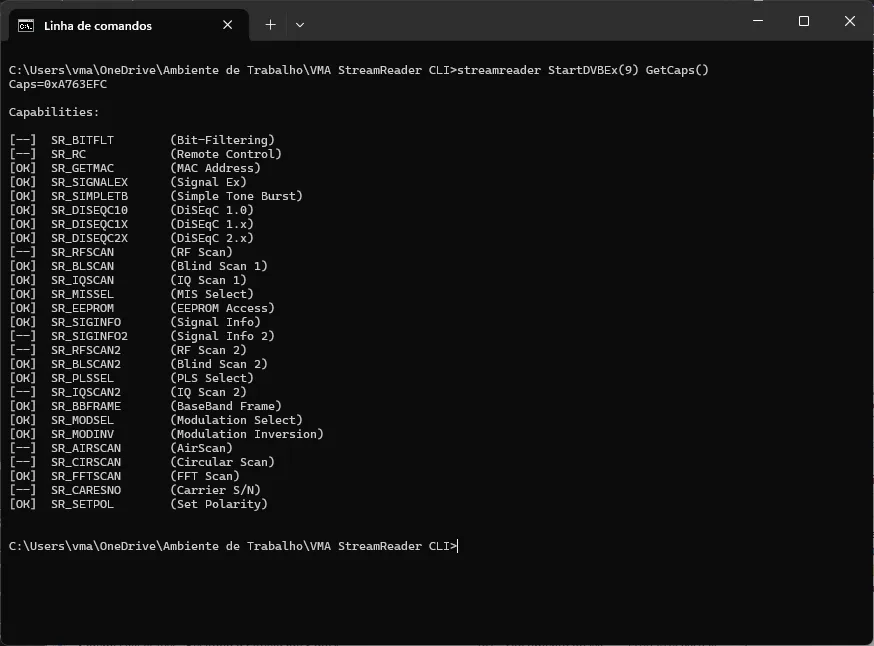
  • Direct capability verification
  • Comparing behavior across different DLL versions
  • Very lightweight TS streaming
  • Automated batch experiments

Usage​

If you run it without arguments:

streamreader

It lists all available commands:

Code:
---------------------------------------------------

****** CrazyScan StreamReader CLI - 20260226 ******

---------------------------------------------------

(C) 2026 VMA-Broadcast - VMA Broadcast

---------------------------------------------------


Available commands:


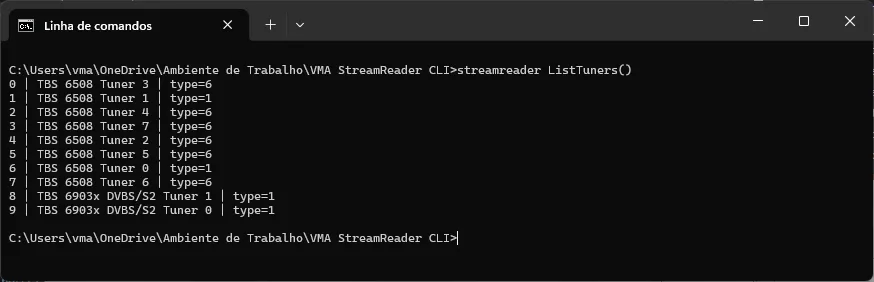
  ListTuners()

  CheckForDVB()

  CheckForDVBExEx()

  StartDVBEx(index)

  StopDVB()


  SendDiSEqC(type,data)

  SendDiseqCmd(byte1,byte2,...)

  SendDiseqCmdEx(byte1,byte2,...)


  SetPol(pol)

  SetChannel(freq,sr,pol,fec,lof1,lof2,lofsw)

  SetChannelEx(freq,sr,pol,fec,lof1,lof2,lofsw,mod)

  SetChannelExEx(freq,sr,pol,mod,lof1,lof2,lofsw,std,pls_mode,pls_code,mis)

  SetChannel2(freq,sr)

  SetChannel2Ex(freq,sr,pol,mod)

  SetChannel2ExEx(freq,sr,pol,fec,mod)


  RFScan(freq,pol,lof1,lof2,lofsw)

  BLScan(freq,range,pol,lof1,lof2,lofsw,minsr)

  BLScanEx(freq,range,pol,lof1,lof2,lofsw,minsr,std)

  BLScan2(freq_start,freq_stop,pol,lof1,lof2,lofsw)

  AirScan(freq_start,freq_stop,step,bw,std)


  SignalInfo()

  SignalInfo2()

  GetSignal()

  GetSignalEx()

  GetSignalExEx()

  GetSignalStrength()

  Statistic()


  FFTInit()

  FFTScan(freq,pol,lof1,lof2,lofsw,range,mode,acc)

  FFTTerm()


  IQScan(input,count)

  IQScan2(input,count)

  CIRScan(hiRes)


  SetFilterRaw(pid)

  DelFilter(filterNum)

  SetBBFilter(is)


  GetMAC()

  GetCaps()

  GetTunerType()

  GetEEPROM(offset,length)

  SetEEPROM(offset,byte1,byte2,...)


  PLSSel(mode,code)

  MISSel(enable,filter,mask)

  ModSel(mod,pilot,frame,...)

  ModInv(waitMs)


  Stream(UDP,ip,port)


Example:

  streamreader StartDVBEx(1) BLScan(11401000,30000,1,9750000,10600000,11700000,1000) Stream(UDP,239.1.1.1,1234)

You can concatenate commands:


streamreader StartDVBEx(1) BLScan(11401000,30000,1,9750000,10600000,11700000,1000) Stream(UDP,239.1.1.1,1234)

Argument validation​

If you provide incorrect arguments, it tells you exactly what is required:

Code:
streamreader StartDVBEx(1) RFScan()

Error: RFScan(freq,pol,lof1,lof2,lofsw) requires 5 arguments

Example:

Code:
streamreader StartDVBEx(1) RFScan(10891000,0,9750000,10600000,11700000)

RFLevel=-50

Practical Applications​

Hardcore DX Testing​

You can now:

  • Replace streamreader.dll with custom versions
  • Modify streamreader.ini
  • Test LOF / LOFSW bending tricks
  • Validate driver behavior across versions
  • Compare tuning sensitivity without GUI interference
Example:

Code:
streamreader StartDVBEx(1) RFScan(11725000,0,9750000,10800000,11750000)

No GUI logic. No constraints. Just DLL-level interaction.


Lightweight TS Streaming​

If your interest is the transport stream only, not the RF analysis:

Code:
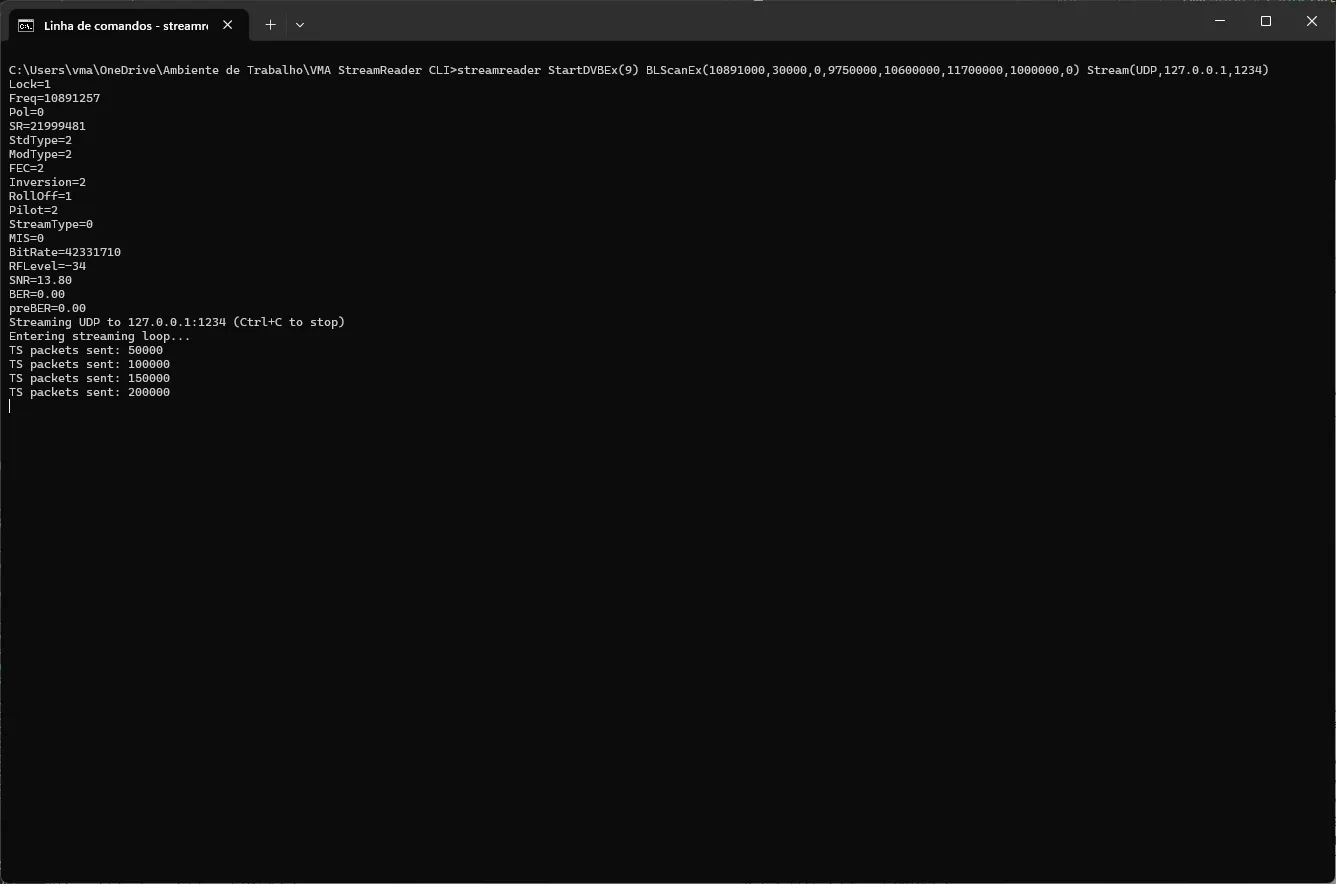
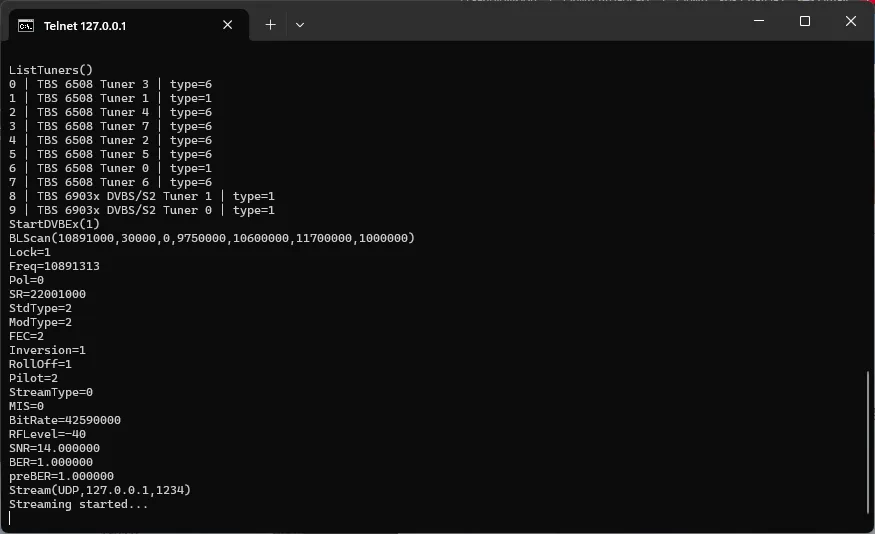
streamreader StartDVBEx(9) BLScanEx(10891000,30000,0,9750000,10600000,11700000,1000000,0) Stream(UDP,127.0.0.1,1234)
CPU usage is extremely low.

index.php

It works well as a minimal TS forwarder.

Important Notes​

  • 100% free
  • Not part of VMA Video Analyser Package
  • Fully standalone
  • No DRM
  • Pure utility tool
It does one thing: Expose the full power of streamreader.dll directly to the command line.


Feedback Welcome​

I am very interested in feedback from:

  • DXers
  • Blindscan experimenters
  • Anyone comparing different streamreader builds
  • Anyone pushing unusual LOF configurations
  • Anyone testing MIS / PLS / S2X behaviors
Constructive suggestions are very welcome.


Examples​


Last edited:
New version available at Download – VMA Broadcast

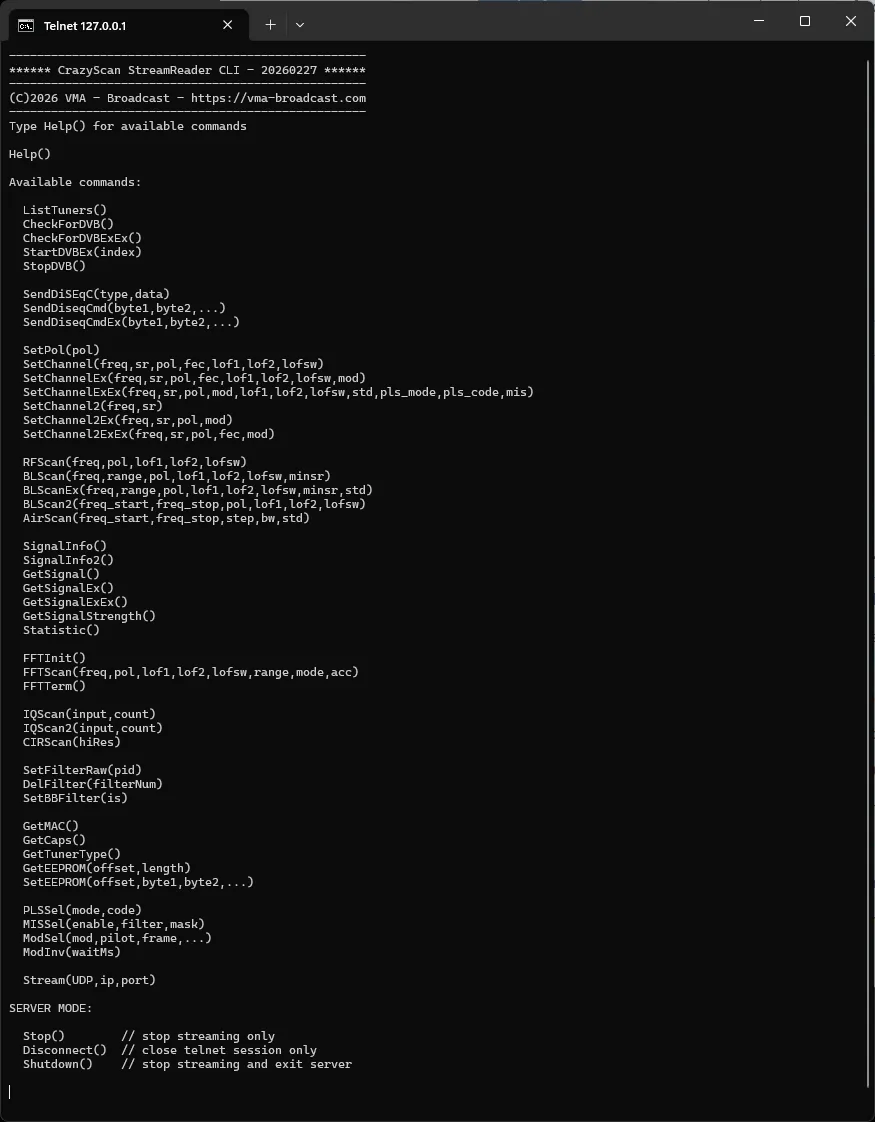
Many improvements and support for either CLI access (one liner with calls separated by space) or telnet (allows both one liner calls with calls separated by space or individual calls).

Via telnet full remote operation is possible.

Help() command lists all possibilities

streamreader -server 127.0.0.1 8888 runs in telnet mode

Stop() terminates streaming

Disconnect() terminates telnet connection (but keeps server running)

Shutdown() terminates telnet connection and server

Running streamreader can be terminated with CTRL+C


No.

It only works with cards supported by CrazyCat's streamreader.dll, because it is mainly a front-end to access all its functions via CLI or telnet.

Dektec has a different SDK, which is well documented and includes CLI demos.

TSDuck supports Dektec cards.
 
Here some examples (*.bat, *.py and *.ps1).

For *.py you need Python3 and *.ps1 is started:

Code:
powershell -ExecutionPolicy Bypass -File .\blindscan.ps1

Code:
PS D:\OneDrive - Norcam\Documentos\Development\VMA Video Analyser Package\streamreader\Installer\VMA StreamReader CLI> powershell -ExecutionPolicy Bypass -File .\blindscan.ps1

=========================================
      DVB-S/S2 BLScanEx Step Scanner
=========================================

Tuner number: 1
Start frequency (MHz or kHz): 10700
Stop frequency  (MHz or kHz): 11700
Step / increment (kHz): 10000
RF threshold (dBm): -55
10700000 kHz - No lock (RF=-46)
10710000 kHz - No lock (RF=-44)
10720000 kHz - No lock (RF=-39)
10730000 kHz - No lock (RF=-37)
10740000 kHz - Lock=1 Freq=10773323 Pol= SR= Std= Mod= FEC= RollOff= Pilot= SNR=9.750000 RF=-42.000000
10750000 kHz - No lock (RF=-39)
10760000 kHz - Lock=1 Freq=10773323 Pol=H SR=22002000 Std=DVB-S2 Mod=8PSK FEC=3/4 RollOff=0.20 Pilot=ON SNR=9.750000 RF=-39
10770000 kHz - Lock=1 Freq=10773323 Pol=H SR=22001000 Std=DVB-S2 Mod=8PSK FEC=3/4 RollOff=0.20 Pilot=ON SNR=9.750000 RF=-39
10780000 kHz - Lock=1 Freq=10802825 Pol=H SR=22001000 Std=DVB-S2 Mod=8PSK FEC=3/4 RollOff=0.35 Pilot=ON SNR=9.750000 RF=-39
10790000 kHz - Lock=1 Freq=10802825 Pol=H SR=22001000 Std=DVB-S2 Mod=8PSK FEC=3/4 RollOff=0.35 Pilot=ON SNR=9.750000 RF=-39
10800000 kHz - Lock=1 Freq=10802825 Pol=H SR=22001000 Std=DVB-S2 Mod=8PSK FEC=3/4 RollOff=0.35 Pilot=ON SNR=9.500000 RF=-39
10810000 kHz - No lock (RF=-43)
10820000 kHz - Lock=1 Freq=10832327 Pol=H SR=22002000 Std=DVB-S2 Mod=8PSK FEC=2/3 RollOff=0.35 Pilot=ON SNR=9.750000 RF=-39
10830000 kHz - Lock=1 Freq=10832327 Pol=H SR=22001000 Std=DVB-S2 Mod=8PSK FEC=2/3 RollOff=0.35 Pilot=ON SNR=9.500000 RF=-39
10840000 kHz - No lock (RF=-40)
10850000 kHz - Lock=1 Freq=10891331 Pol=H SR=22002000 Std=DVB-S2 Mod=8PSK FEC=2/3 RollOff=0.35 Pilot=ON SNR=14.250000 RF=-40
10860000 kHz - Lock=1 Freq=10891331 Pol=H SR=22002000 Std=DVB-S2 Mod=8PSK FEC=2/3 RollOff=0.35 Pilot=ON SNR=9.750000 RF=-40
10870000 kHz - Lock=1 Freq=10891331 Pol=H SR=22001000 Std=DVB-S2 Mod=8PSK FEC=2/3 RollOff=0.35 Pilot=ON SNR=9.750000 RF=-41
10880000 kHz - Lock=1 Freq=10891331 Pol=H SR=22002000 Std=DVB-S2 Mod=8PSK FEC=2/3 RollOff=0.35 Pilot=ON SNR=14.000000 RF=-41
10890000 kHz - Lock=1 Freq=10891331 Pol=H SR=22001000 Std=DVB-S2 Mod=8PSK FEC=2/3 RollOff=0.35 Pilot=ON SNR=9.750000 RF=-40
10900000 kHz - Lock=1 Freq=10920832 Pol=H SR=22002000 Std=DVB-S Mod=QPSK FEC=7/8 RollOff=0.35 Pilot=AUTO SNR=14.000000 RF=-40
10910000 kHz - Lock=1 Freq=10920836 Pol=H SR=22002000 Std=DVB-S Mod=QPSK FEC=7/8 RollOff=0.35 Pilot=AUTO SNR=14.000000 RF=-40
10920000 kHz - Lock=1 Freq=10920836 Pol=H SR=22001000 Std=DVB-S Mod=QPSK FEC=7/8 RollOff=0.35 Pilot=AUTO SNR=14.250000 RF=-40
10930000 kHz - Lock=1 Freq=10964336 Pol=H SR=22001000 Std=DVB-S2 Mod=8PSK FEC=2/3 RollOff=0.35 Pilot=ON SNR=9.750000 RF=-40
10940000 kHz - Lock=1 Freq=10964336 Pol=H SR=22002000 Std=DVB-S2 Mod=8PSK FEC=2/3 RollOff=0.35 Pilot=ON SNR=15.500000 RF=-40
10950000 kHz - Lock=1 Freq=10964336 Pol=H SR=22002000 Std=DVB-S2 Mod=8PSK FEC=2/3 RollOff=0.35 Pilot=ON SNR=15.250000 RF=-40
10960000 kHz - Lock=1 Freq=10964336 Pol=H SR=22002000 Std=DVB-S2 Mod=8PSK FEC=2/3 RollOff=0.35 Pilot=ON SNR=15.250000 RF=-40
10970000 kHz - Lock=1 Freq=10993842 Pol=H SR=22002000 Std=DVB-S2 Mod=8PSK FEC=5/6 RollOff=0.35 Pilot=ON SNR=13.500000 RF=-41
10980000 kHz - Lock=1 Freq=10993842 Pol=H SR=22002000 Std=DVB-S2 Mod=8PSK FEC=5/6 RollOff=0.35 Pilot=ON SNR=13.500000 RF=-41
10990000 kHz - Lock=1 Freq=10993842 Pol=H SR=22001000 Std=DVB-S2 Mod=8PSK FEC=5/6 RollOff=0.35 Pilot=ON SNR=13.500000 RF=-41
11000000 kHz - No lock (RF=-43)
11010000 kHz - Lock=1 Freq=11052841 Pol=H SR=22002000 Std=DVB-S2 Mod=8PSK FEC=2/3 RollOff=0.35 Pilot=ON SNR=14.750000 RF=-41
11020000 kHz - Lock=1 Freq=11052841 Pol=H SR=22002000 Std=DVB-S2 Mod=8PSK FEC=2/3 RollOff=0.35 Pilot=ON SNR=15.250000 RF=-41
11030000 kHz - Lock=1 Freq=11052841 Pol=H SR=22002000 Std=DVB-S2 Mod=8PSK FEC=2/3 RollOff=0.35 Pilot=ON SNR=15.250000 RF=-41
11040000 kHz - Lock=1 Freq=11052841 Pol=H SR=22002000 Std=DVB-S2 Mod=8PSK FEC=2/3 RollOff=0.35 Pilot=ON SNR=15.500000 RF=-41
11050000 kHz - Lock=1 Freq=11052841 Pol=H SR=22002000 Std=DVB-S2 Mod=8PSK FEC=2/3 RollOff=0.35 Pilot=ON SNR=15.250000 RF=-41
11060000 kHz - Lock=1 Freq=11052841 Pol=H SR=22001000 Std=DVB-S2 Mod=8PSK FEC=2/3 RollOff=0.35 Pilot=ON SNR=15.250000 RF=-41
11070000 kHz - Lock=1 Freq=11082344 Pol=H SR=22001000 Std=DVB-S2 Mod=8PSK FEC=3/4 RollOff=0.20 Pilot=ON SNR=9.500000 RF=-38
11080000 kHz - Lock=1 Freq=11082344 Pol=H SR=22001000 Std=DVB-S2 Mod=8PSK FEC=3/4 RollOff=0.20 Pilot=ON SNR=13.250000 RF=-38
11090000 kHz - Lock=1 Freq=11111847 Pol=H SR=22001000 Std=DVB-S2 Mod=8PSK FEC=2/3 RollOff=0.35 Pilot=ON SNR=9.750000 RF=-39
11100000 kHz - Lock=1 Freq=11111847 Pol=H SR=22002000 Std=DVB-S2 Mod=8PSK FEC=2/3 RollOff=0.35 Pilot=ON SNR=9.500000 RF=-39
11110000 kHz - Lock=1 Freq=11111847 Pol=H SR=22002000 Std=DVB-S2 Mod=8PSK FEC=2/3 RollOff=0.35 Pilot=ON SNR=9.750000 RF=-39
11120000 kHz - No lock (RF=-41)
11130000 kHz - No lock (RF=-19)
11140000 kHz - No lock (RF=-41)
11150000 kHz - No lock (RF=-39)
11160000 kHz - No lock (RF=-44)
11170000 kHz - No lock (RF=-41)
11180000 kHz - No lock (RF=-41)
11190000 kHz - No lock (RF=-38)
11200000 kHz - No lock (RF=-45)
11210000 kHz - Lock=1 Freq=11243853 Pol=H SR=22002000 Std=DVB-S Mod=QPSK FEC=5/6 RollOff=0.35 Pilot=AUTO SNR=14.750000 RF=-39
11220000 kHz - Lock=1 Freq=11243853 Pol=H SR=22001000 Std=DVB-S Mod=QPSK FEC=5/6 RollOff=0.35 Pilot=AUTO SNR=14.750000 RF=-39
11230000 kHz - Lock=1 Freq=11243857 Pol=H SR=22002000 Std=DVB-S Mod=QPSK FEC=5/6 RollOff=0.35 Pilot=AUTO SNR=14.750000 RF=-40
11240000 kHz - Lock=1 Freq=11243857 Pol=H SR=22001000 Std=DVB-S Mod=QPSK FEC=5/6 RollOff=0.35 Pilot=AUTO SNR=15.000000 RF=-39
11250000 kHz - Lock=1 Freq=11273359 Pol=H SR=22002000 Std=DVB-S2 Mod=8PSK FEC=2/3 RollOff=0.35 Pilot=ON SNR=9.750000 RF=-39
11260000 kHz - Lock=1 Freq=11273359 Pol=H SR=22001000 Std=DVB-S2 Mod=8PSK FEC=2/3 RollOff=0.35 Pilot=ON SNR=9.750000 RF=-39

1772199596536.webp
 

Attachments

New version: https://vma-broadcast.com/wp-content/upl…%2020260228.zip

- Added for-next loops
- Added -out command to redirect output to test files
- Added -fmt command to specify format
- Includes a manual and sample scripts

VMA Stream Reader Python Demo 5.py (requires Python v3 and matplotlib)

Server:

1772329182909.webp

Telnet Client:
1772329193537.webp

Python script:

1772329236293.webp

Spectrum scan and double click on transponder:

1772329484165.webp

Running Blind Scan:

1772329361835.webp

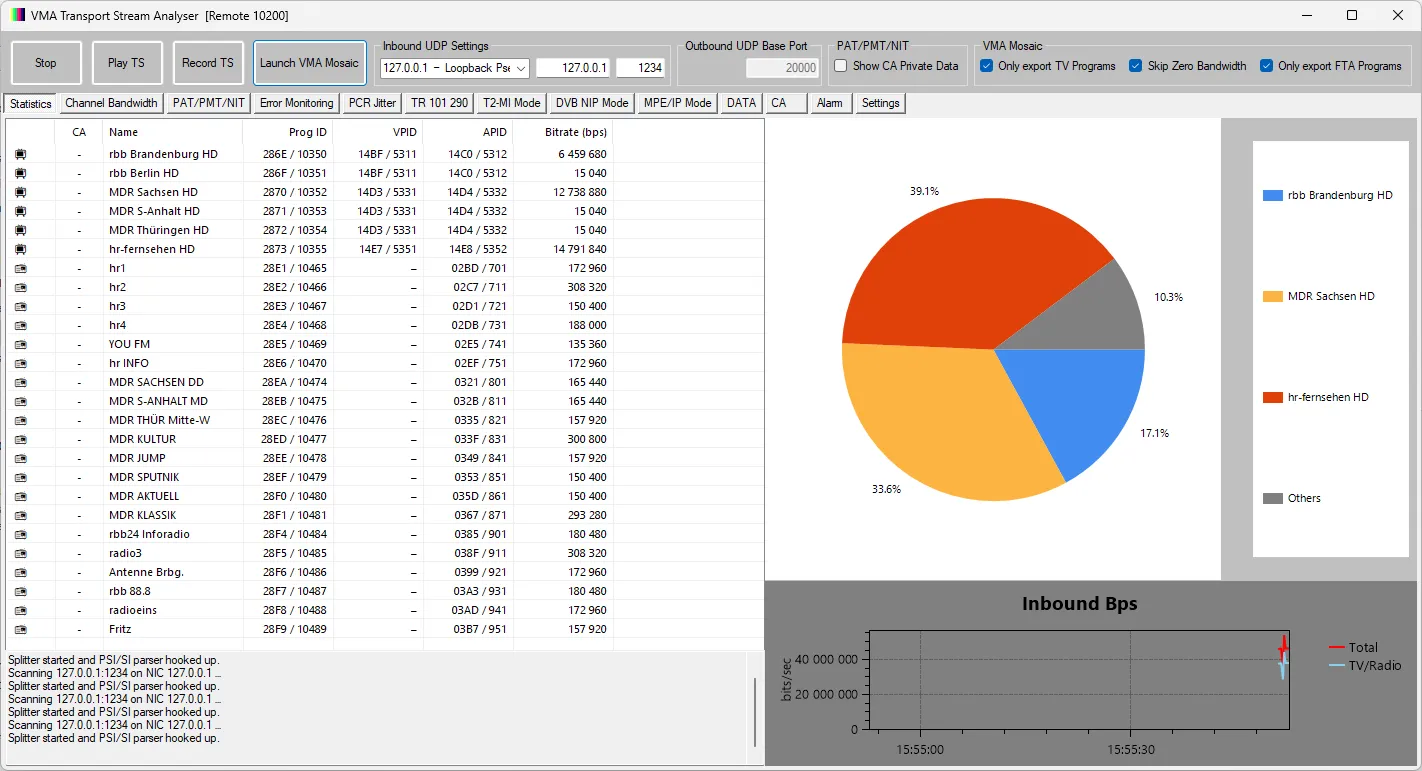
With locked transponder, the TS is streamed to UDP://127.0.0.1:1234

1772329493668.webp

This is just a demonstration of what can be achieved with VMA StreamReader CLI!
 
New version available:
VMA StreamReader CLI now supports:

  • for(...) loops
  • If(...) conditional execution
  • Print(...) statements
  • Script file execution
You can now execute full scripts directly:

streamreader < script.txt
This allows piping a text file containing commands (including loops and conditions) instead of typing them interactively.

1772411423615.webp

Several internal improvements and optimizations have also been implemented.

Please refer to the updated manual for full details.

I am looking forward to seeing some serious DX experiments, automated blind scans, and tuner stress testing with VMA StreamReader CLI.

Please share your scripts and experiments!
 
1772449886051.webp
1772449898807.webp

The Python script now supports cards with FFTScan() - like the TBS-6903x!

It supports Blind Scan for cards without RFScan() capability, too. But this is, as we all know, slow.

The advantage over regular apps like VMA Stream Reader is that you can EDIT the Python script with any editor (Notepad++ is recommended) and improve/hack it at your own will.

The whole script is just 533 lines and fairly easy to understand. Much easier than changing the >15.000 lines of code that compose VMA Stream Reader...
 

Attachments

View attachment 167587
View attachment 167588

The Python script now supports cards with FFTScan() - like the TBS-6903x!

It supports Blind Scan for cards without RFScan() capability, too. But this is, as we all know, slow.

The advantage over regular apps like VMA Stream Reader is that you can EDIT the Python script with any editor (Notepad++ is recommended) and improve/hack it at your own will.

The whole script is just 533 lines and fairly easy to understand. Much easier than changing the >15.000 lines of code that compose VMA Stream Reader...
I would be equally interested in the 15000 lines of code, to learn from it....
 
That is not going to happen.
 

Attachments

Last edited:
Is there an option to get the blind scan to run in FFT mode for a TBS6903x card or is it resfricted to an RF mode blind scan please?
 
Look at the name of the script!
It is specifically made and tested for the TBS 6903x!
It does NOT use RFScan() at all.

You can use the VMA StreamReader.py script, which will work for any card, as it reads the capabilities and selects RFScan() vs FFTScan() accordingly.
 
Look at the name of the script!
It is specifically made and tested for the TBS 6903x!
It does NOT use RFScan() at all.

You can use the VMA StreamReader.py script, which will work for any card, as it reads the capabilities and selects RFScan() vs FFTScan() accordingly.


My apologies, the FFT option was listed above, eye test long overdue !
 
I have dowloaded the CLI app version before the latest update posted minutes ago and the additionaI script files in the hope of testing. However, as a novice in the world of using command prompts, powershell and terminal windows I think this might be a long journey.

I have created a specific folder on my C:\ drive named C:\VMA\StrCLI and unpacked all of the CLI app files and python scripts into that folder. My first issue is that in a cmd prompt window if I run the CLI app without any arguments I get a system error message box popping up instead of the list of available commands.

Would anyone please be able to advise me if I need to install anything like a Visual C++ distribution package into Windows. I tried using powershell but it failed.

.
1772876303158.webp


My working folder contents are listed in the picture below.

1772876953572.webp
 
Last edited:
The error indicates that the Microsoft Visual C++ runtime required by the program is not installed on your system.

Please download and install the Microsoft Visual C++ Redistributable (2015–2022) from Microsoft:

After installing it, restart the program and it should run normally.
 
Note that you need Python3 and two libraries in your system to run the *.py scripts:

pip install numpy matplotlib
 
Back
Top