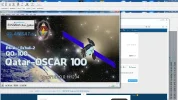
Advice Needed Receivers with the lowest Symbol Rate?

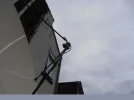
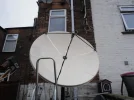
Quick pictures of the homebrew tripod made from 15mm copper tube with the bullseye lnb mounted..
Miserable grey cloudy day here but the 1.8 alcoa looks to be performing well enough....
even though the bullseye is designed for an offset dish not PF.
 

Attachments
  • P1010062.webp
    P1010062.webp
    333.5 KB · Views: 79
  • P1010063.webp
    P1010063.webp
    143.1 KB · Views: 47
Last edited:
I'm feeling like its one step forward 2 steps back.
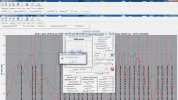
I'm trying to stream the output from crazyscan to TSreader which in my case is an older version already installed on this win7 PC ver 2.7.0.0
I belive TS reader uses internal IP 127.0.0.1 port 6969 TCP..
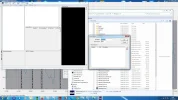
but when I try to stream crazyscan out ..I get the error in the screencap..
wtf am I doing wrong ?
This was easy once...but I got old..
Gone back to default settings just so as to check I can scan Horizontal transponders on 26E and pull a fta constellation ...then stream it to a video output.

perhaps the location of TSreader is critical...ie folder location ?
 

Attachments

  • cscan g.webp
    cscan g.webp
    239.1 KB · Views: 38
Verify the path to the TSR in crazyscan.ini against the actual location of the TSR on your PC
 
With a modified LNB and the UCLAN Ustym 4K Pro, you can receive amateur radio signals on QO-100 without any issues.
Yes, the 'modified' LNB part was an option a lot of members either didn't want to try, or failed to understand the frequency band required.

A change of crystal in the PLL versions, or if very lucky with a DRO type, screwing around with the puck (ooerr !)

The receiver still requires the new Local oscillator frequency in both cases.
 
Hence the fall, playing with the phone while climbing the ladder!
 
Try using port 2301 or 2302.
 
Thanx for trying to help Satesco...
I'm getting close to giving up.
Crazyscan will run ..and perform a blindscan.
I choose a locked transponder and click on the graph.
The carrier searcch and constellation monitor appears...and confirms a QPSK signal locked.
stop the constellation monitor...and press the DVB button to open TS reader ....and the error appears..cannot open TS reader.
Ive checked and double checked the path is correct to X86 Cool stf ...and copied the path directly into the crazyscan ini ...as there appears no other way to do this..from crazyscan itself.
using 127.0.0.1 port 6969 ...also tried 2301/2 with no change.
I've even uninstalled TSreader pro and found an earlier version here :-https://www.videohelp.com/software/TSReader-Lite/old-versions

Chose TSReaderLite2.7.45b.exe
Still the same errors.
Either thyere is something incompatible with Win7 ...an API call or lib file missing that it expects to find or I'm installing something wrong.

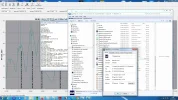
Interestingly I can open TSreader lite directly with the .exe in coolstf see pix..
Just can't open it through crazyscan...and I just dont know why
error message :- cant start stream analyzer isn't particularly helpful or informative.
 

Attachments

  • cscan I.webp
    cscan I.webp
    226.6 KB · Views: 24
  • cscan j.webp
    cscan j.webp
    135.5 KB · Views: 26
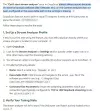
I think I can see the problem here, in your executable path for TSreader, you're missing /p at the beginning (your current path reads 'rogram Files' on Path1)
 
Ive checked and double checked the path is correct to X86 Cool stf ...and copied the path directly into the crazyscan ini ...as there appears no other way to do
Path wrong
Code:
C:rogram...
 
That'll do for tonight..
progress was made.
Since I could only enter stream analyser details by manually modding the crazyscan ini file with notepad.
Strangely copy/pasting the path was the problem.
It would enter correctly ..but when I ran up crazyscan the copy paste text I'd entered in the ini file had changed ..and was corrupted.
No Idea how or why....but typing it in long hand instead of copy paste avoided this strange corruption of the path details.
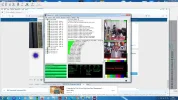
pix of it working attached.
I have a copy of 4T2 ...so maybe I'll try to get that running tomorrow
Both Satsearcher and Enosat spotted the path corruption that was occurring ..post above this one.
Why it happens ? no idea..
 

Attachments

  • cscan k.webp
    cscan k.webp
    208.1 KB · Views: 28
Last edited:
Our colleagues are right: you should look for the correct path for the applications or players in Crazyscan. It would have been good if I’d told you this when I gave you the whole folder containing the CS application.
But now that you’ve told us you’re still using Windows 7, I’ll send you an older version of Crazyscan (2020), from when many users were still on Windows 7 or 10.
If you’ve installed TranEdit, you can use it; it works regardless of the protocol, whether TCP or UDP.
I hope this helps
 
All help is gratefully received buddy..
This morning I managed to lock onto what I suspect is the beacon...but now I need to work out how to resolve the low SR signal into a watchable image..
assuming I am correct.
btw CH ...not too old to climb ladders...but the MS makes for a very unbalanced/unstable Evan once up there.
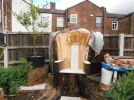
I took a huge tree down earlier this year with a 12 inch blade chinesium chainsaw.
It involved much roping of tree ladders and me ...the job took about 2 months and the stump is now a seat..
see picture
you can tell how wide and tall it was by the fact it can support a seat
I called it Ents Rest...and the seat took another 2 months to complete.
 

Attachments

  • cscan l.webp
    cscan l.webp
    241.5 KB · Views: 23
  • P1010029.webp
    P1010029.webp
    731.8 KB · Views: 36
Another project I'm considering is reception of the goes US weather satellite @ 50 something degrees west....but is only 10 deg above the horizon at my location.
It will require a dedicated dish mounting on my rear wall ...but before I even consider this project ..advice on minimum dish size at 53 N 2.3 W (my location) would be pre-requisit knowledge.
cheers
VS
 
Hello Evan, welcome back! Its fantastic to see you active with us again :) :-respekt

I look forward to following your trips down technical rabbit holes & hopefully chipping in a bit where I can :)

Win10 is ok - especially no MS arent trying to f*ck things up every few weeks now its out of support. Im not keen on win11. With some 3rd party you can turn off win10 phoning home to the mothership & make it look & behave like win7
 
Thanks buddy...
It's going to take me quite a while to get up to speed again...ideed ..if I ever do - lol
I built a windows 10 PC but rarely use it..
I simply never took to it.
I prefer my Win7 ...and still use one as a daily driver.
This occasionally causes issues with compatibility ..re new software ..browsers etc.
Not always backward compatible.
The problem can also work in reverse..
for example my winradio card..which was damned expensive...and requires PCI not PCIe.
..and doesn't play nice with win10 and later.
The Irony is that older hardware often needs older software...but the newer versions of software written for 10 or 11 ..wont always install or run on win7.
So there's the dilemma..
not that win7 is not fast enough or stable enough...just that it deliberatly gets hamstrung.

As for win11 ..there is a special place in hell for it..and it will NEVER be my OS of choice.

My mobo has I believe a place to fit a TPS chip ...which will remain empty ...forever...but does support PCI and PCIe...
I just hope it never dies.
cest la vie.

This is an interesting utube vid...obviously AI narrating..but interesting nonetheless

So how do I combat virae etc..since this is claimed to be the reason to upgrade..
I have an orico clone dock.
My 5tb main hard drive (spinning rust) is in a pull out caddy...and visits the orico frequently to be cloned as a backup.
problem solved.
 
Last edited:
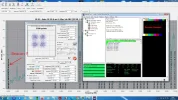
Looks like it was indeed the beacon..
Double clicked on the A71A decoder disabled image and got it to open with TSreader/VLC ...but sadly this version of TSreader is limited and cuts off after 1 minute.
I guess I need a different version ?
 

Attachments

  • cscan m.webp
    cscan m.webp
    145.7 KB · Views: 24
Back
Top